
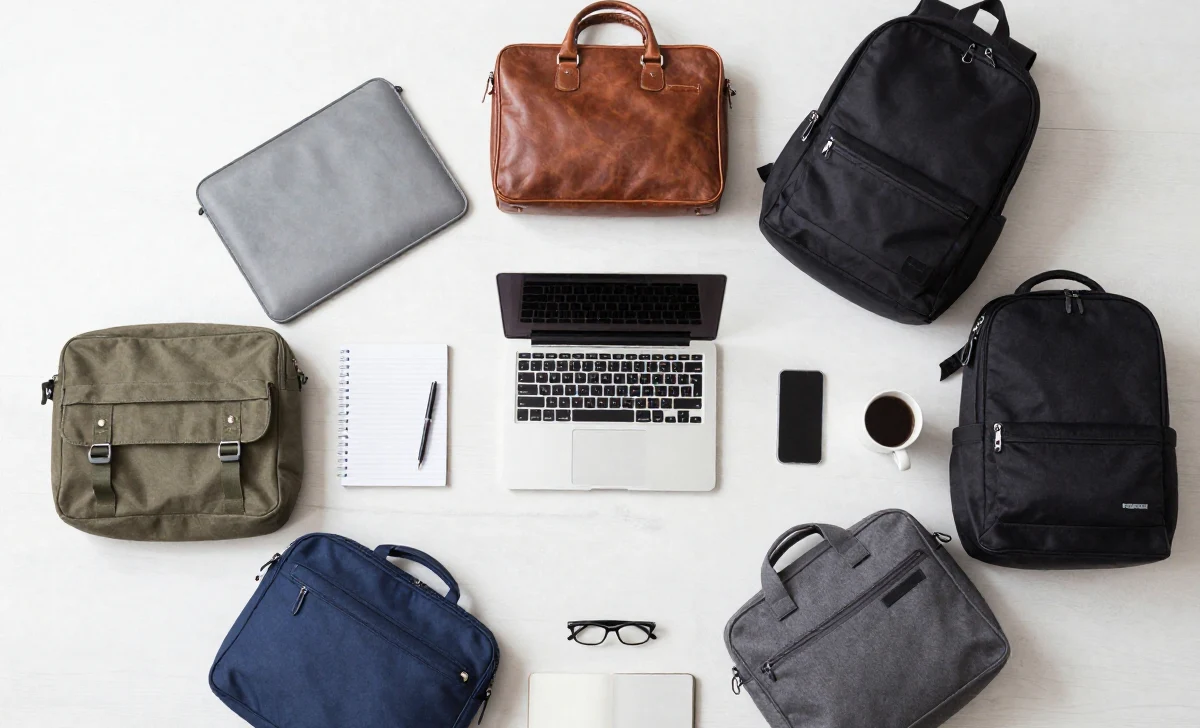
Let’s be honest: buying a laptop bag is rarely at the top of anyone’s “exciting purchases” list. But if you’ve ever struggled with a sore shoulder, frantically dug for a charger at the airport, or watched in horror as your bag’s strap gave way, you know this choice matters more than it seems. Your laptop bag is your mobile office, your tech sanctuary, and your daily companion. The wrong one can turn your commute into a chore; the right one feels like a seamless extension of your workflow.
Gone are the days when your only option was a bulky, black nylon case. The market in 2026 is flooded with styles, materials, and smart features, which is both a blessing and a curse. How do you sift through the noise to find your match? This guide cuts through the marketing speak. We’ll explore the seven primary types of laptop bags, not just as products, but as solutions to specific lifestyles and pain points. By the end, you’ll know exactly what to look for—and what to avoid.
The 7 Laptop Bag Types, Decoded for Your Life
Here’s a detailed breakdown of each category, complete with who it’s for, key features, and real-world pros and cons.
1. The Sleeve or Envelope Bag: The Minimalist’s Second Skin
- Best For: Anyone who primarily needs scratch protection inside another bag (like a larger backpack or tote), or for ultra-minimalist travel to a coffee shop.
- The Reality Check: Think of a sleeve as a protective undershirt for your laptop, not a standalone bag. Made from neoprene, felt, or leather, it excels at safeguarding against dings and spills within another bag. Many have a front pocket for a charger or tablet.
- The User Question It Answers: “I just want something super light and slim to throw in my larger work bag. Do I need more?”
- Key Features: Padded interior, often a microfiber lining, simple zip or flap closure. Some newer models in 2026 have integrated cable organizers.
- Pros: Maximum lightness, sleek profile, affordable.
- Cons: Zero carrying capacity on its own (no handles/strap), poor organization. Not suitable as a primary bag for most.
2. The Handle or Shoulder Bag: The Classic Business Companion
- Best For: Professionals in formal or business-casual environments who carry a laptop, essential documents, and a few small accessories to meetings.
- The Reality Check: This is the modern briefcase. It projects professionalism and keeps your items orderly. The single shoulder strap or top handle offers a classic carry. Look for models with a dedicated, padded laptop compartment that’s suspended off the bottom—a key feature for protection.
- The User Concern It Addresses: “I need to look polished in front of clients, but my old bag is heavy and kills my shoulder.”
- Key Features: Structured design, professional materials (leather, ballistic nylon), multiple interior dividers, secure closures (often combination locks), a trolley sleeve for sliding over suitcase handles.
- Pros: Professional aesthetic, excellent organization for files and small tech, quick access.
- Cons: Can become uncomfortably heavy on one shoulder if overloaded; weight distribution is uneven compared to a backpack.
3. The Laptop Backpack: The All-Rounder Champion
- Best For: Students, commuters, travelers, and just about anyone who values hands-free comfort and needs to carry more than just a laptop.
- The Reality Check: The backpack has evolved. Today’s best laptop backpacks are engineering marvels with ergonomic, ventilated straps, sternum straps, and lumbar support. They separate your tech from your other gear, often with a dedicated, padded laptop compartment that can be accessed independently via a side or front zipper—a game-changer for airport security.
- The Common Discussion: “Backpacks look too casual for the office.” This is changing. Many brands now offer sophisticated, water-resistant backpacks in muted colors and clean designs that are perfectly office-appropriate.
- Key Features: Padded laptop sleeve (check dimensions for 14-inch, 15-inch, or 17-inch laptops), multiple internal and external pockets, water bottle pockets, durable weather-resistant materials, luggage passthrough.
- Pros: Even weight distribution, hands-free comfort, high capacity, versatile for work/travel/commute.
- Cons: Can be bulky, and accessing items sometimes requires taking the bag off.
4. The Messenger Bag: The Urban Convenience Play
- Best For: Cyclists, urban commuters, and creative professionals who value style and need quick, frequent access to their gear without removing the bag.
- The Reality Check: The cross-body strap and flap design allow you to swing the bag to your front and grab your camera, notebook, or phone in seconds. It’s inherently more accessible than a backpack while on the move. Modern versions have much better shoulder padding than early models.
- The User Pain Point: “I’m always on my bike/bus, and I need to grab my transit pass or headphones constantly without stopping.”
- Key Features: Single cross-body strap, flap-over main compartment, often a quick-access pocket on the flap, internal organization slots.
- Pros: Stylish, excellent accessibility, easier to manage in crowded spaces than a backpack.
- Cons: Can still cause shoulder and back strain if heavily loaded (weight sits on one side), less secure than a zippered backpack (flaps can be flipped open).
5., 6., & 7. The Size-Specific Carries: 14-inch, 15-inch, & 17-inch+ Bags
The size of your laptop is your most critical filter. A bag designed for a specific size offers superior protection and fit.
- 14-inch Bags: For ultra-portables like MacBook Airs or Dell XPS 13s. These bags are light and compact. The key question here is: “Will this fit my laptop with its sleeve or case on?” Always check the internal dimensions, not just the screen size label.
- 15-inch Bags: The sweet spot for most professionals (MacBook Pro, many Windows workhorses). This category offers the most variety. Look for bags that can also accommodate your charger, a tablet, and a notebook without being cavernous.
- 17-inch+ Bags: For mobile workstations, gamers, or creators. These are serious bags. Durability is paramount—the combined weight of a large laptop and accessories is significant. Reinforced stitching, robust zippers (like YKK), and padded, wide straps are non-negotiable. The bag must have a rigid or semi-rigid frame to prevent sagging.
The 2026 Feature Checklist: What Actually Matters
Beyond style, these are the elements that impact daily use. Use this as your inspection list.
- Material & Build Quality: Ballistic nylon and Cordura are tough favorites. Polyester should be high-denier. Check stitch density—loose stitching fails first.
- Protection: Padded compartments should have thick, firm foam. A false bottom (where the laptop sleeve is raised off the bag floor) is a top-tier feature that protects from bumps and drops.
- Organization: Do you prefer a few large pockets or many small ones? Dedicated, padded slots for sunglasses, tablets, and pens prevent the “black hole” effect.
- Comfort Engineering: Padded, breathable back panels prevent sweaty backs. Adjustable, contoured shoulder straps distribute weight. A sternum strap stabilizes the load.
- Security: RF-shielded pockets protect credit cards from skimming. Lockable zippers add peace of mind for travel.
- Weather Resistance: A DWR (Durable Water Repellent) coating handles rain splashes. For downpours, look for bags made with TPU-laminated fabrics or that include a built-in rain cover.
Ask Yourself These 3 Critical Questions
Before you even look at a product page, pause. The best choice hinges on your personal answers.
What’s Your Primary Use Case?
Are you a digital nomad living in airports, a student biking across campus, a hybrid worker commuting twice a week, or a professional who needs a sleek bag for client meetings? Your daily reality dictates the bag’s required durability, style, and capacity.
What’s Your “Load-Out” Beyond the Laptop?
Think beyond the machine. Do you carry a tablet, noise-canceling headphones, a large water bottle, notebooks, or specialized tech? A photographer’s needs differ from a coder’s. List your everyday carry items—it’s the best way to gauge the organization you’ll need.
What’s Non-Negotiable for Your Comfort?
Do you have back issues requiring ergonomic support? Do you run hot and need a breathable back panel? Is quick-access to your phone a must during your walk? Identifying your comfort deal-breakers upfront saves time and regret.
Making Your Final Decision: A Practical Flow
- Match Type to Lifestyle: Student/Commuter? Start with Backpacks. Corporate Professional? Consider Handle Bags or sophisticated Backpacks. Frequent Traveler? Prioritize Backpacks or Messenger Bags with luggage passthrough.
- Filter by Laptop Size: This will immediately narrow your options by 70%.
- Audit for Your Must-Have Features: Use the checklist above. Is water resistance mandatory? Do you need a separate shoe compartment?
- Read Reviews, But Wisely: Ignore generic 5-star reviews. Look for detailed, long-term reviews (6+ months of use) that mention durability, comfort over time, and real-world organization. Photos from users are invaluable.
- Consider the Long-Term: A well-made laptop bag from a reputable brand should last 5+ years. It’s an investment in your daily comfort and your tech’s safety.
Your perfect laptop bag isn’t about the trendiest brand; it’s the one that disappears into your routine because it works so seamlessly. It protects your valuable tech, carries your essentials comfortably, and suits your personal style. By understanding the core types and prioritizing the features that match your actual life, you can move beyond the overwhelm and choose a bag you’ll rely on—and appreciate—every single day. Now, go forth and carry with confidence.